Make the key pair for single sign-on (SSO), add the public key in Studio, and change or replace keys later without downtime.
Only the owner can add or remove keys. The owner is the person who created the community in their TribeCrafter account. Other admins see "Only the community owner can change sign-in settings." If you are the developer, you make the keys and the owner pastes the public key into Studio.
The two keys
SSO uses a key pair: 2 files that are made together and only work together.
| Private key | Public key | |
|---|---|---|
| File (with the commands below) | tc-sso-private.pem |
tc-sso-public.pem |
| First line | -----BEGIN PRIVATE KEY----- |
-----BEGIN PUBLIC KEY----- |
| What it does | Signs the sign-in tokens your server makes | Lets the community check those tokens |
| Where it goes | Only your server | Studio, under Public keys |
| If someone else gets it | They can sign in to the community as any member. Replace it at once. | Nothing. It can't make tokens. |
Before you paste a file, open it in a text editor. If the first line says PUBLIC KEY, paste it. If it says PRIVATE KEY, stop.
TribeCrafter never makes, sees or stores your private key. Studio refuses a private key.
Make the key pair
Use ES256 (an EC P-256 key). RS256 also works, with an RSA key of at least 2048 bits.
# ES256
openssl genpkey -algorithm EC -pkeyopt ec_paramgen_curve:P-256 -out tc-sso-private.pem
openssl pkey -in tc-sso-private.pem -pubout -out tc-sso-public.pem

# or RS256
openssl genpkey -algorithm RSA -pkeyopt rsa_keygen_bits:2048 -out tc-sso-private.pem
openssl pkey -in tc-sso-private.pem -pubout -out tc-sso-public.pem
Run the commands on your own computer or server. They work in a terminal on macOS and Linux, and in Git Bash or WSL on Windows. Without OpenSSL, Node.js makes the same ES256 pair:
node -e "const {generateKeyPairSync}=require('crypto');const fs=require('fs');const k=generateKeyPairSync('ec',{namedCurve:'P-256',privateKeyEncoding:{type:'pkcs8',format:'pem'},publicKeyEncoding:{type:'spki',format:'pem'}});fs.writeFileSync('tc-sso-private.pem',k.privateKey);fs.writeFileSync('tc-sso-public.pem',k.publicKey)"
Then:
- Store
tc-sso-private.pemwith your server's other secrets (an environment variable or a secrets manager). Don't email it, commit it to a repository, or put it in a browser or mobile app. - Pick a key name, for example
acme-2026. Your server puts it in thekidheader of every token, so the community knows which key to check. - Give the owner the key name, the type (ES256 or RS256) and the contents of
tc-sso-public.pem.
Add the public key in Studio
- In Studio, go to Settings → Sign-in & SSO.
- Under Public keys, click Add a public key.
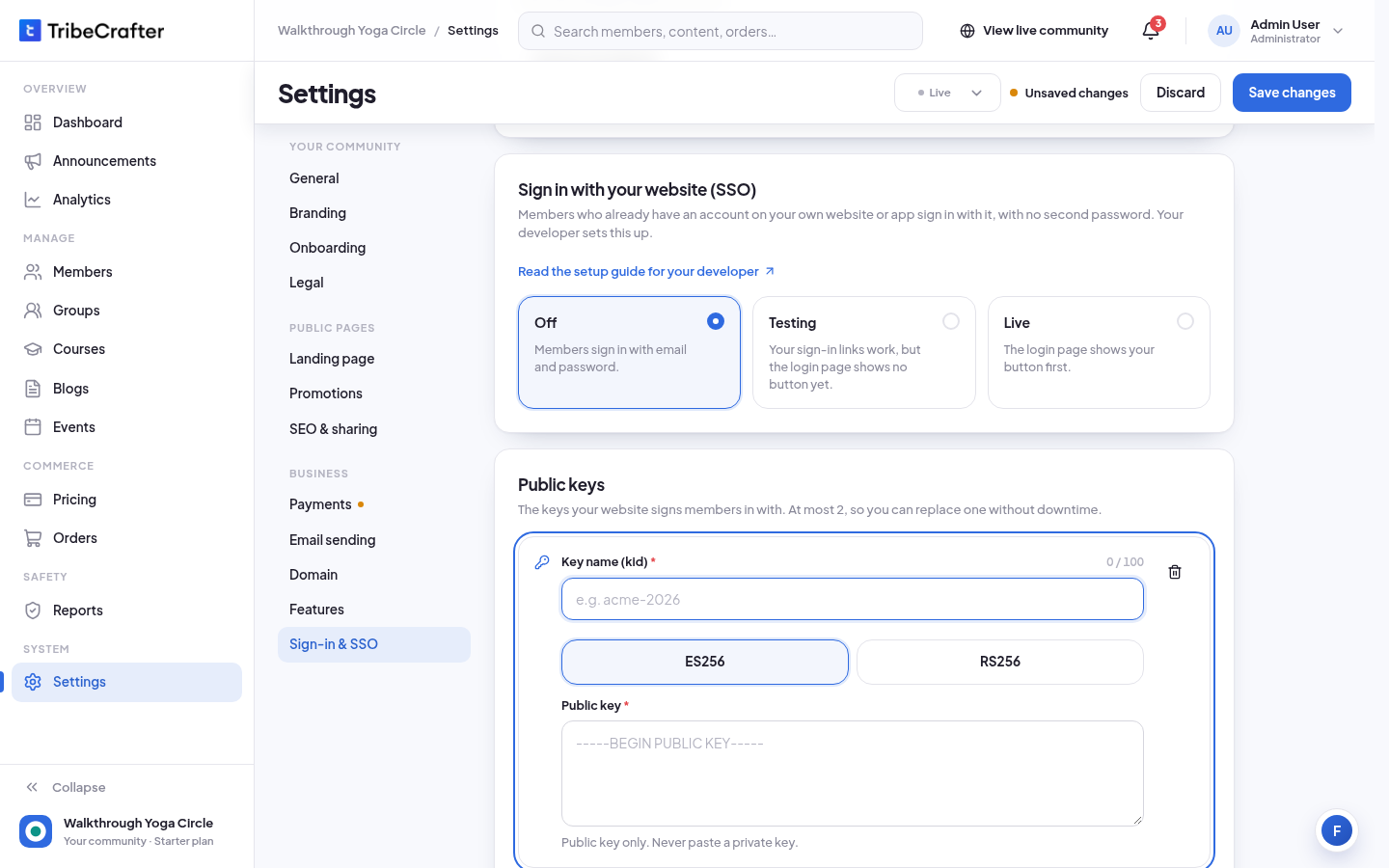
- In Key name (kid), enter the key name, exactly as your server sends it in
kid(up to 100 characters). - Under Key name (kid), pick ES256 or RS256, the same as your key.
- In Public key, paste the whole public key, from
-----BEGIN PUBLIC KEY-----to-----END PUBLIC KEY-----. - Click Save changes. You see "Changes saved successfully."
After you save, the key shows its name, its type and the date it was added. Studio does not show the key text again. To change a key, remove it and add a new one.
Rules
- At most 2 keys at once. Add a public key is hidden when there are 2.
- Each key name is used once.
- An ES256 key must be an EC P-256 public key. An RS256 key must be an RSA public key of at least 2048 bits.
- Testing and Live need at least one key.
Replace a key without downtime
- Make a new pair with a new key name.
- The owner adds the new public key in Studio, next to the old one, and clicks Save changes.
- Switch your server to the new private key and the new
kid. - The owner clicks the trash icon next to the old key, then clicks Save changes.
If the private key is lost or leaked
- Lost (for example, a server was rebuilt): make a new pair and add the new public key. SSO sign-ins fail until your server signs with a key the community has.
- Leaked, or sent to anyone by mistake: make a new pair, add the new public key, and remove the old key in Studio straight away.
If something goes wrong
| Message | What to do |
|---|---|
| "Paste the public key (it starts with -----BEGIN PUBLIC KEY-----)." | You pasted something else, often the private key. Paste the contents of the public key file. |
| "Add a public key before you turn SSO on." | Add a key, then pick Testing or Live. |
| "Sign-in link invalid" (on the community, after a sign-in) | The kid or alg in the token doesn't match a saved key, or the token was signed with another private key. |