Choose which paid groups, courses and blog collections a plan or product unlocks, from Pricing or from the group or course itself.
A plan or product can unlock three kinds of content: Courses, Groups and Blog collections. Events can't be included. Only paid content can be sold. Free groups and courses are open to every member already. See How access and selling work.
Only Community Admins can choose what a plan or product unlocks.
From Pricing
-
In Studio, go to Pricing. Open a plan or product and click Edit, or create a new one.
-
Open the Content step.
-
Turn on Courses, Groups or Blog collections.
-
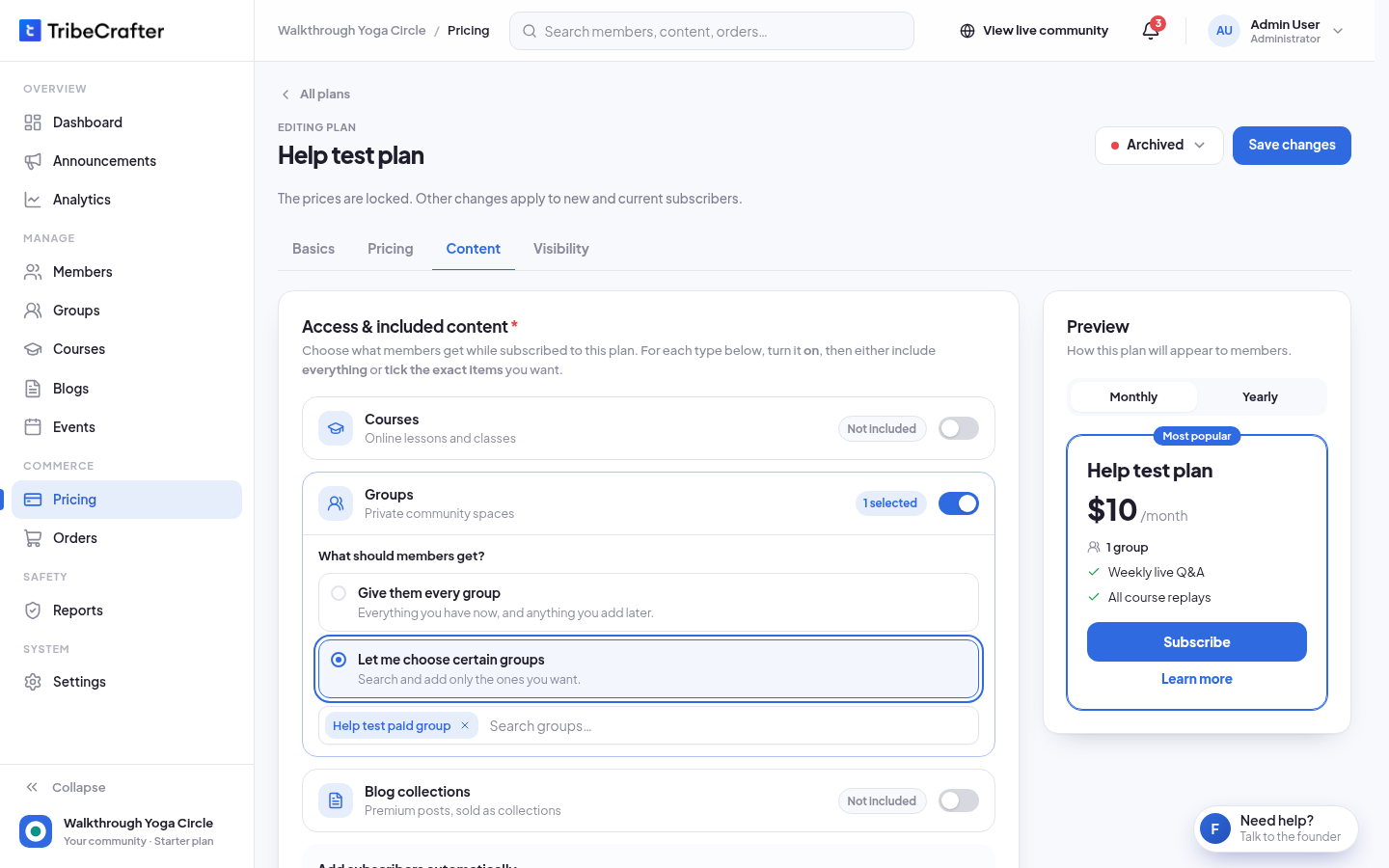
Under What should members get?, choose one:
- Give them every course (or group, or premium post): "Everything you have now, and anything you add later."
- Let me choose certain courses (or groups, or collections): "Search and add only the ones you want." Then click the search box and tick the items.
-
Repeat for the other types you want. You can mix them, for example every course and 2 groups.
-
Click Save changes (or continue to Next: Publish on a new plan or product).
Each type shows its state: Not included, All included, N selected, or Pick items below while you still need to choose.
The search lists only paid groups and courses. If you have none, you see "No paid groups yet. Only paid groups can be sold." For blog collections with none yet: "No blog collections yet. Create one under Blogs."
Add members automatically
When you pick certain groups or courses, a box Add subscribers automatically (on a product: Add buyers automatically) appears. Members are added as soon as they pay. Turn an item off if members should join it themselves. If it is the only group (or course) in the plan, it is always added: "Always added: it's the only group in this plan."
With Give them every group (or course), members join each one themselves with one click. Blog posts don't need joining: members can read them right away.
From a group or course
You can also choose how a group or course is sold on the item itself.
- Open the group (or course) and click Edit.
- Open the Access step (on a course: Who can join).
- Choose Paid.
- Pick plans under Subscription plans ("Members get this group while they stay subscribed.") and products under One-time products ("Members who buy are added to this group automatically, for the access time the product gives."). Drafts show as "Draft, not on sale yet".
- Click Save changes.
The box How members get into this group lists every plan and product that gives access, and how members get in, for example "Joins with 1 click".
To create a new plan or product there, click Create a plan or product (or Create a subscription / Create a one-time product). You see "How should members pay for {name}?" Pick Subscription or One-time payment and fill in the short form. It creates the plan or product already on sale, so Stripe must be ready. It sets no image, description or sale price: add those later in Pricing. In this form, product access is set in days only.
To see what sells a group or course, open it and click the Access tab. Sold through lists each plan and product, with its price and status.
Blog collections
Premium posts are sold in collections. Open Blogs → Collections and open a collection. Under Sold in, click Add it to a plan or product. Members who buy one of these can read every post in the collection.
Rules
- A paid group or course can't be published until a plan or product on sale sells it. Drafts and closed plans don't count. You see "Add a plan or product so members can join. You can create one right there, on the Access step."
- Free groups and courses can't be added to a plan or product: "Free groups and courses can't be sold (…). Remove them, or make them paid first."
- If Courses or Blogs is turned off in Settings → Features, a plan or product can't include them.
- A higher-priced plan gives everything in every cheaper plan that is on sale. In How members get into this group, this shows as "Via higher plan".
- Content changes on a plan apply to current subscribers too. Content you remove is taken away from them.
- Course Managers can't choose plans or products. They see "Community admins decide how a course is sold: its plans, products and prices. Save the course, then ask them here."