Create a plan that members pay for every month or every year, and choose what it unlocks.
A plan is a subscription. Members keep access while they stay subscribed. For a single payment, create a one-time product instead. New to selling? Read How access and selling work first.
Before you start
- Who: only Community Admins can open Pricing.
- Stripe: you can save a draft without Stripe. To put the plan on sale, Stripe must be ready in Settings → Payments. See Connect Stripe to get paid.
- Currency: prices are in your community's currency, set in Settings → General. It locks once any plan or product leaves draft, or once an order exists.
- Paid content: a plan can include only paid groups, paid courses and blog collections. Make a group or course paid first.
Create the plan
-
In Studio, go to Pricing. On the Plans · subscriptions tab, click Create plan.
-
Basics: fill in Plan name (3 to 40 characters).
-
Under Benefits, add 2 to 4 selling points, one per line (up to 100 characters each). Click Add benefit for each new line. Members see them on your pricing page.
-
Optional: fill in Web address (left blank, it is made from the name) and upload a Plan image (1:1 square, 1000 × 1000 px recommended).
-
Click Next: Pricing.
-
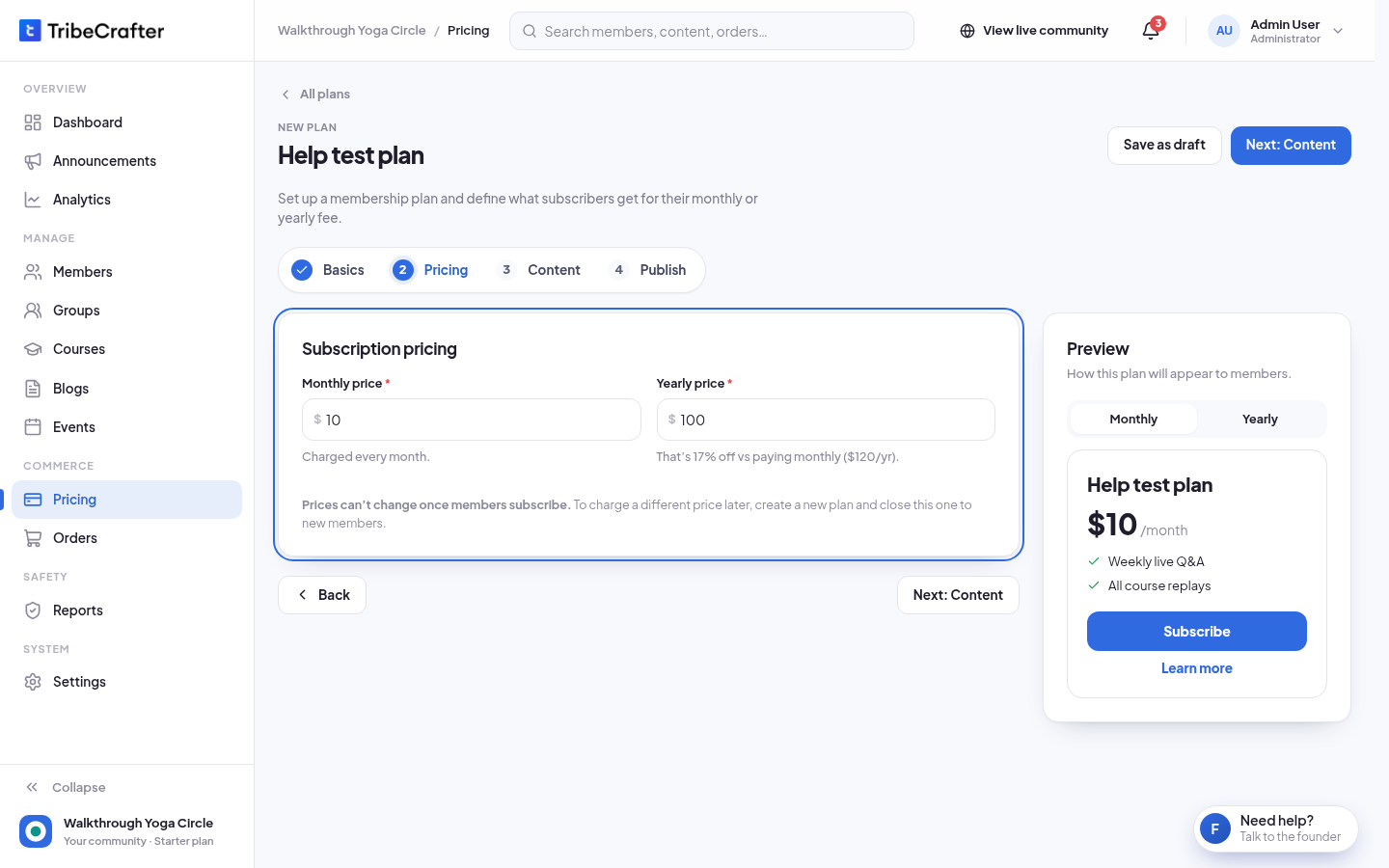
Fill in Monthly price and Yearly price. Both are needed. Studio shows how much members save by paying yearly, for example "That's 17% off vs paying monthly ($120/yr)."
-
Click Next: Content. Turn on Courses, Groups or Blog collections, then choose everything of that type or pick items. See Choosing what a plan or product unlocks.
-
Click Next: Publish. Under Where members find it, turn on Recommended if you want this plan highlighted, and Show in Google search if you want people to find it on Google.
-
Check the Before you publish summary.
-
Click Publish plan. You see "Plan published. Members can subscribe now." Not ready yet? Click Save as draft. You see "Draft saved. Members can't see it yet."
The Preview on the right shows the plan as members will see it. The Recommended plan shows a Most popular badge there.
Prices can't change
Prices lock when you create the plan. On a saved plan, the price boxes are read-only.
To charge a different price later, create a new plan. Then set the old plan to Closed to new members. Its subscribers keep their price.
Plan statuses
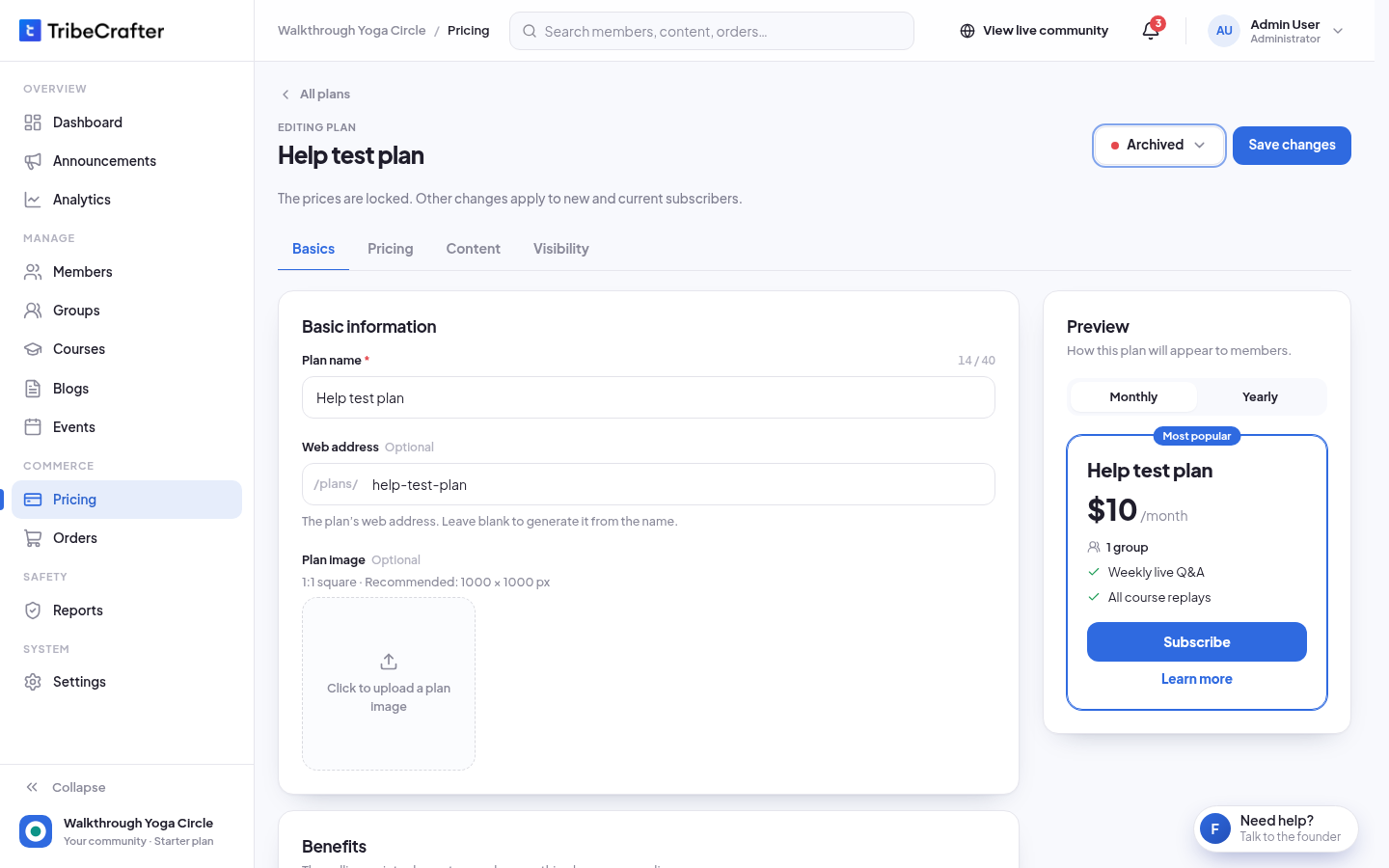
To change the status, open the plan, click Edit, then click the status button next to Save changes and pick a status. Confirm in the box that opens.
| Status | New members | Current subscribers |
|---|---|---|
| Draft | Can't see it. Only admins see it. | None yet |
| On sale | Can subscribe | Keep renewing |
| Closed to new members | Can't subscribe. The plan leaves your pricing page. | Keep renewing at their price |
| Archived | Can't subscribe. The plan leaves your pricing page. | Keep access until their next renewal date, then the plan ends. They are not charged again. |
When you archive a plan, each subscriber gets an email before their plan ends: 7 days before for a monthly plan, 30 days before for a yearly plan. They can then pick another plan.
If you put an archived plan back On sale or Closed to new members, subscribers whose plan has not ended yet keep renewing. They get an email that their plan continues.
Rules and limits
| Rule | What you see |
|---|---|
| Plan name: 3 to 40 characters | "Plan name must be at least 3 characters." |
| 2 to 4 benefits | "Add 2 to 4 benefits. Members see them on the pricing page." |
| Both prices, each at least 1 | "Enter both prices. Each must be at least 1. To give content away, make it free instead of creating a plan." |
| Yearly price not lower than monthly | "The yearly price can't be lower than the monthly price." |
| At most 2 decimals | "Use at most 2 decimals." |
| At least one content type | "Select at least one content item or choose All for a content type." |
| Up to 4 plans on sale at a time. Closed and archived plans don't count. | "N of 4 plans are on sale. You can sell up to 4 at a time." |
| Only one Recommended plan, even among drafts and archived plans | "Only one plan can be recommended. Turn it off on the other plan first." |
| Two plans on sale can't have the same monthly and yearly prices | "Another plan on sale has the same monthly and yearly prices. Plans need different prices." |
- There is no free trial.
- Studio also warns about prices that look wrong, for example "Yearly is less than 2 months of monthly. Is this a typo?" You can still save.
- Changes to the name, benefits, image and content apply to new and current subscribers. Content you remove is taken away from current subscribers.
- Once anyone has subscribed, the plan can never go back to Draft. Studio shows "Not possible: N subscribers. Close it to new members or archive it."
- You can delete only a draft that nobody has subscribed to and that has no orders. Otherwise, archive it. On the plan, click ⋯ → Delete or Archive. A greyed-out Delete shows the reason, for example "Only draft plans can be deleted. Archive it instead."
If something goes wrong
| Message | What to do |
|---|---|
| "Connect Stripe before you publish: members can't pay until it is set up. Save this as a draft now, and publish after you connect Stripe in Settings → Payments." | Click Save as draft. Connect Stripe, then publish the plan. |
| "You can sell up to 4 plans at a time, so your pricing page stays easy to choose from…" | Close another plan to new members or archive it. Or save this one as a draft. |
| "Free groups and courses can't be sold…" | Remove the free item from the plan, or make it paid first. |
| "Courses is turned off in this community. Turn it on to add courses to a plan or product." | Turn Courses on in Settings → Features, or remove courses from the plan. |