What you pay TribeCrafter for each community, the free trial and the founding offer, and where you manage your plan.
This article is about what you pay TribeCrafter. The plans and products you sell to your members are separate, and you set their prices.
The plans
Each community has its own plan. Prices are in US dollars.
| Starter | Growth | Scale | Enterprise | |
|---|---|---|---|---|
| Paid monthly | $65 a month | $195 a month | $389 a month | Custom |
| Paid yearly | $49 a month ($588 a year) | $149 a month ($1,788 a year) | $299 a month ($3,588 a year) | Custom |
| Storage | 100 GB | 500 GB | 1 TB | Custom |
| Team seats | 3 | 10 | 30 | Unlimited |
| Max file size | 2 GB | 10 GB | 50 GB | Unlimited |
| Video | 1080p | 1080p, no downloads | 1440p, no downloads | 4K, Studio DRM |
Studio DRM is studio-grade copy protection for video. It is not the Studio app.
Every plan includes:
- Unlimited members, groups, courses and events.
- Every feature: News Feed, groups, courses, blog, events, chat and selling.
- 0% transaction fees.
- Priority support and help with onboarding. In Studio, click Need help? to reach the founder.
Team seats are your Community Admins and Moderators. Course Managers and Blog Managers don't take a seat.
Storage counts everything uploaded to your community: videos, images, files and member uploads.
For Enterprise, click Contact sales on the plan page.
Free trial
- Starter and Scale start with a 14-day free trial. Growth does too, once the founding spots are gone. You don't need a card.
- You get 1 free trial per TribeCrafter account.
- When the trial ends, your community goes offline until you choose a plan. After that, your community card in your TribeCrafter account shows the date your community is deleted unless you choose a plan.
- Studio reminds you: in the last 7 days of the trial you see "Free trial ends " with Choose a plan under Needs your attention on the Dashboard.
Founding offer
The first 30 communities can get Growth for $99 a month, billed yearly ($1,188 a year). The price is locked for 12 months. The founding offer has no free trial.
While spots are open, the plan page shows the founding offer in Growth's place, with the spots left ("Founding offer · 29 left"). Click Claim founding spot. While spots are open, you can't choose Growth at its normal price.
What "0% transaction fees" means
When a member pays you, the money goes to your own Stripe account. TribeCrafter takes no fee from your sales. Stripe charges its own card fee. To set this up, see Connect Stripe to get paid.
Manage your plan and billing
Only the owner can do this: the person who created the community in their TribeCrafter account.
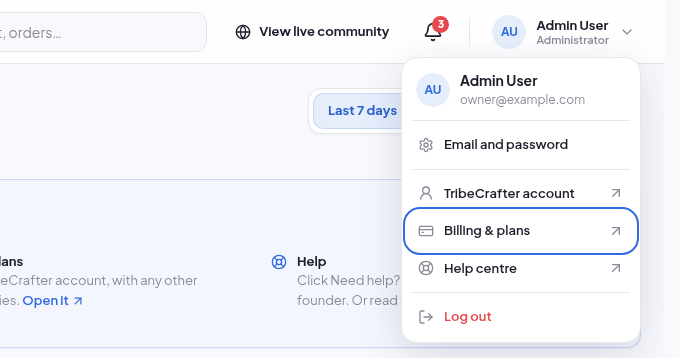
- In Studio, open the account menu at the top right and click Billing & plans. Or sign in at app.tribecrafter.net and open Billing & plans.
- Use the tabs:
- Subscriptions: one row for each community, with its plan, amount and status.
- Payment method: the card for your subscriptions.
- Invoices: your billing history for all your communities.
- During the free trial, click Choose a plan on your community's row.
- On a paid plan, click Manage on your community's row. In Manage subscription, click Change plan or Cancel subscription.
- A move to a bigger plan starts at once. You pay the difference for the rest of the period.
- A move to a smaller plan starts at your next renewal.
- When you cancel, your plan runs to the end of the period you paid for. After that, your community card in your TribeCrafter account shows the date your community is deleted unless you choose a plan.
Other Community Admins don't see Billing & plans. In Studio they read "The community owner manages it."