Open Studio, where you set up and run your community, and know which sign-in you use where.
Your TribeCrafter account and your community
You use two places. Each has its own sign-in.
| Your TribeCrafter account | Your community | |
|---|---|---|
| Address | app.tribecrafter.net | Your community's address (first an address ending in tribecrafter.app, later your own domain) |
| What you do there | Your TribeCrafter plan, billing and invoices, and the list of communities you run | Everything your members see, and Studio, where you set it up and run it |
| Your sign-in | The email and password you chose when you signed up to TribeCrafter | An account in your community with the same email |
You don't need a second password. When you open Studio or your community from your TribeCrafter account, you are signed in automatically.
The two passwords are separate. Changing one does not change the other.
Open Studio from your TribeCrafter account
- Sign in at app.tribecrafter.net.
- On your community's card, click Open Studio. Studio opens in a new tab, already signed in. On your first visit a tour covers the page: finish or close it first.
View community next to it opens your community as members see it, also signed in. It works only once your community is live.
Open Studio from your community
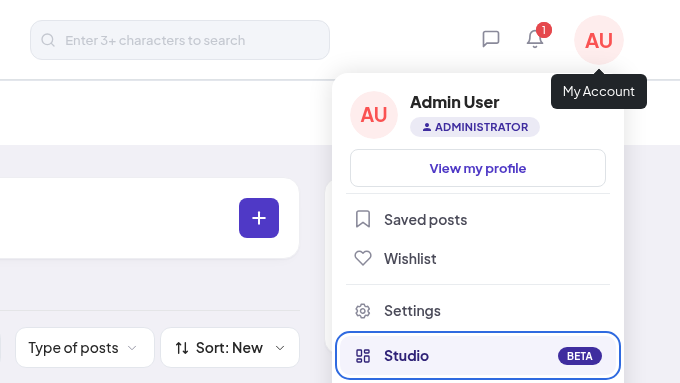
- In your community, click your picture or initials at the top right to open the account menu.
- Click Studio (it has a BETA badge). Studio opens in a new tab, already signed in.
Before your community is live, people see a holding page instead of your community. On that page, click Open Studio.
If you are signed out, your community asks you to sign in first. Then Studio opens. That sign-in page also shows "Community owner? Open your community from your TribeCrafter account": as the owner, this is the easiest way in.
Sign in to your community directly
To sign in at your community's address with an email and password, set a community password first:
- On your community's sign-in page, click Forgot Password.
- In Email, type the email of your TribeCrafter account. Click Send reset link.
- Open the link in the email and choose a password.
- Sign in with your email and the new password.
Who can open Studio
Studio is for your team. What each role sees:
| Role | What they see in Studio | Studio opens on |
|---|---|---|
| Community Admin (the owner is one too) | Everything | Dashboard |
| Moderator | Members, Groups, Reports | Members |
| Course Manager | Courses | Courses |
| Blog Manager | Blogs | Blogs |
| Member | Nothing. Members have no Studio item and can't open it. |
- The menu shows only what a role can use. Studio also checks the role again on every action.
- A role change works at once. You don't need to sign out and in again.
- Moderators, Course Managers and Blog Managers never see member emails.
- Community Admins and Moderators each take a team seat on your TribeCrafter plan. Course Managers and Blog Managers don't.
- Some things are for the owner only: TribeCrafter account and Billing & plans in the Studio account menu, and Settings → Domain, Settings → Email sending and Settings → Sign-in & SSO. Other Community Admins don't see the 2 menu items. They can open the 3 Settings pages, but the buttons there are off. In Settings → Payments, only the person who connected Stripe can open Stripe.
To give someone a role, see Member roles explained.
How long you stay signed in
Your Studio sign-in lasts 1 day. After that, Studio signs you in again by itself through your community. You don't have to do anything.
To sign out, open the account menu at the top right of Studio and click Log out. This signs you out of Studio and of your community.
If something goes wrong
| You see | What to do |
|---|---|
| No Studio item in your community's account menu | Your role is Member. Ask the owner or a Community Admin to give you a team role. |
| "You don’t have access to " / "Your role can’t open this page. If you need it, ask a community admin to change your role." | Your role can't use this screen. Ask a Community Admin. |
| "We couldn’t sign you in" / "Reload the page in a minute. If it keeps happening, contact support." | Reload the page after a minute. If it happens again, click Need help? at the bottom right. |
| Open Studio is off in your TribeCrafter account ("Your community isn't ready yet or is suspended") | A new community can take a minute or two. If your community is suspended, check Billing & plans in your TribeCrafter account. |
On a phone
- In your community, tap the menu button at the top right, then tap Studio.
- In Studio, the sidebar is hidden. Tap the menu button at the top left to open it.