Know when you can delete a group, course, blog post or event, and when to archive or cancel it instead.
The rule is the same everywhere: you can delete only a draft that nothing depends on. Everything else is archived (or, for events, cancelled). Archiving keeps your records, and you can undo it. Members already in an archived group or course keep access; an archived blog post is hidden from everyone.
Before you start
- Community Admins can archive and delete everything here.
- Moderators see Archive on groups, but the server refuses it.
- Course Managers archive courses and Blog Managers archive posts.
- Only Community Admins can delete groups and courses.
Archive
Archiving hides an item from new members.
- In Studio, open Groups, Courses or Blogs.
- Click ⋯ on the item's row, then Archive.
- Confirm. You see "Group archived successfully.", "Course archived." or "Post archived."
To bring it back, open the item, click Edit, pick Published in the status menu, and save.
| Archived item | What happens |
|---|---|
| Group | Hidden from new members. Current members keep access. |
| Course | New members can't find or enroll in it. Enrolled members keep access. |
| Blog post | Hidden from members. You can publish it again. |
Your community needs one published group to stay live. You can't archive or unpublish the last published group. Publish another group first.
Delete
Delete is greyed out when the item can't be deleted. The menu tells you why.
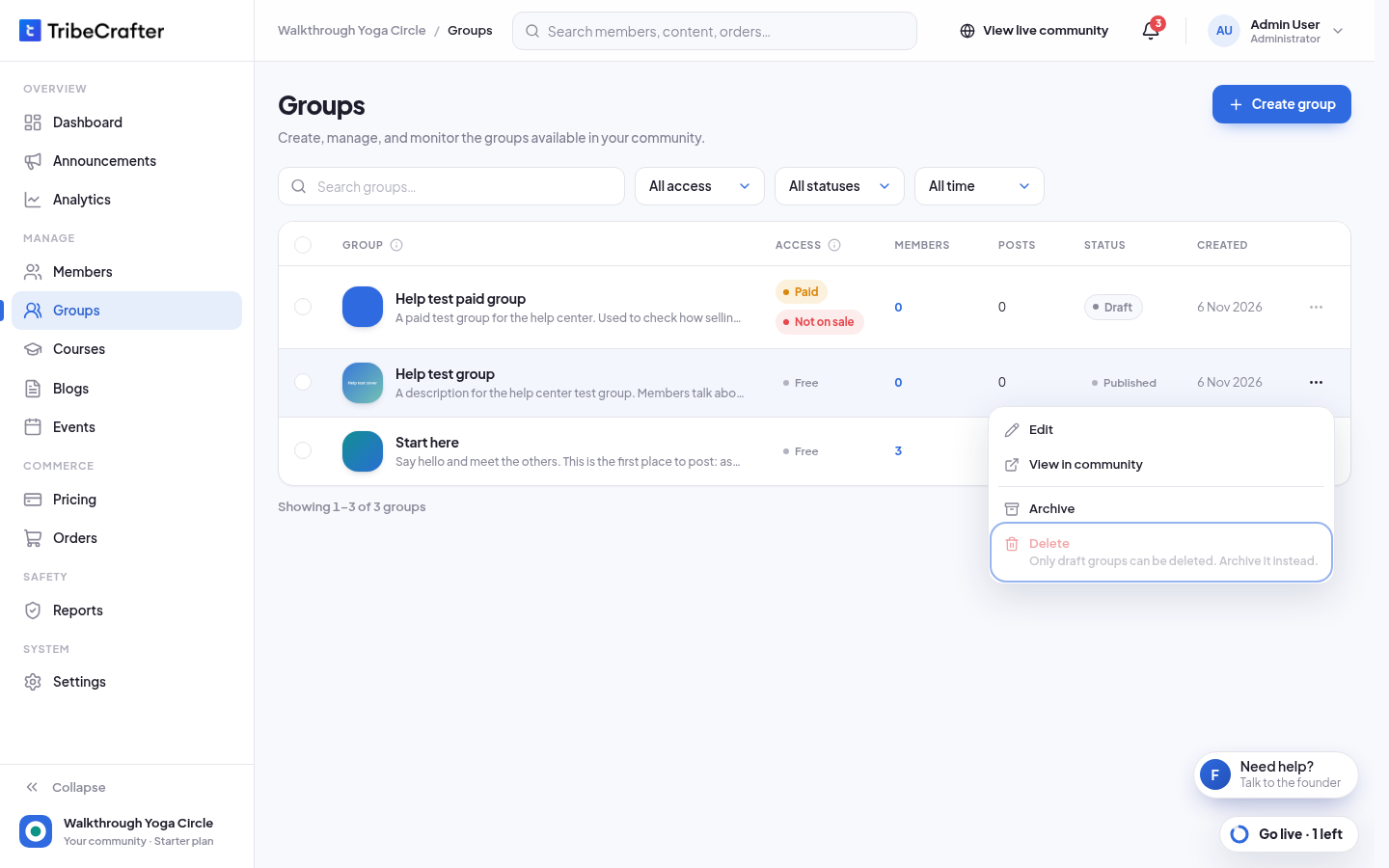
| Item | You can delete it only when |
|---|---|
| Group | It is a draft, with no members (now or in the past), no posts, and no plan or product that includes it |
| Course | It is a draft, with no lessons, no learners (now or in the past), and no plan or product that includes it |
| Blog post | It is a draft and is in no collection |
| Event | It is a draft. A published event is cancelled instead. |
| Collection | No plan or product sells it, and no member has access through it |
Deleting can't be undone.
Studio may show Delete on a published or archived blog post. The delete is refused after you confirm. Archive the post instead.
Common reasons you see:
- "Only draft groups can be deleted. Archive it instead."
- "This group has posts. Archive it instead."
- "A plan or product includes this course. Archive it instead."
- "This post is in a collection members pay for. Archive it instead."
Events: cancel instead
A published event can't be archived or deleted. Cancel it: open the event, click ⋯, then Cancel event…. Members who are going get an email and a notification. See Create an event.
Plans and products
Plans and products follow their own rules for closing and archiving. See Create a subscription plan.