Know each step a new member goes through to join, and where to see who is stuck.
How people get an account
People join in one of three ways:
- They sign up on your community. The Sign up button and your landing page lead to the sign-up page. Members sign up with an email and a password.
- You invite them. In Studio, go to Members → Invite members. Each person gets an email with a button that reads Join and your community's name. It opens the sign-up page with their email filled in. An invite does not make an account. The person still signs up and onboards like everyone else. See Managing your members for the steps and limits.
- You share your invite link. The Invite members dialog shows your sign-up link under Or share your invite link. Click Copy link and post it anywhere, for example in a chat group or your own email.
Signing up is free. Paid groups, courses and blog posts unlock after the member joins, with a plan or product, or when you give them access.
The steps a new member goes through
- Sign up. They enter an email and a password twice, then click Create account.
- Verify the email. They see "Verify your email" and get an email with a link. They can't sign in until they click it. If the email doesn't come, they can ask for a new one from the same screen after 2 minutes.
- Welcome. The link in the email signs them in. They see your Welcome heading and Welcome text, and click Let's get started.
- Profile. They fill in First name and Last name. They can add a Profile photo, a Cover photo, About, Location and Gender. Profile photo and About are required unless you set Profile picture and Bio to Optional in Settings → Onboarding.
- Guidelines. They read your community guidelines, tick "I have read and agree to the community guidelines." and click Enter the Community. The button stays off until they tick the box.
After step 5 the member lands on the newsfeed. Free groups that have Add new members automatically turned on add them at this point.
You write the welcome texts and guidelines, and choose what the profile needs, in Settings → Onboarding. See Set up member onboarding.
If a member skips onboarding
The welcome screen has Skip for now. A member who skips can look around the community. When they try to take part, for example join a group, they see "Finish Your Onboarding" with a Continue setup button. They can post, comment, join and message only after they finish all 3 steps.
See who hasn't finished
In Studio, go to Members. With no filter on, the line above the list counts your members, for example "53 people · 44 active · 6 haven't finished signing up · 2 haven't verified their email · 1 suspended."
Each member has a status:
| Status | What it means |
|---|---|
| Email not verified | Signed up but has not confirmed their email yet. |
| Not onboarded | Has an account but hasn't finished the welcome steps yet. |
| Active | Can sign in and take part. |
| Suspended | Can't sign in until you reactivate them. |
To list only one kind, open All statuses and pick Active, Suspended or Not onboarded. You can't filter by Email not verified, but those members still show in the list.
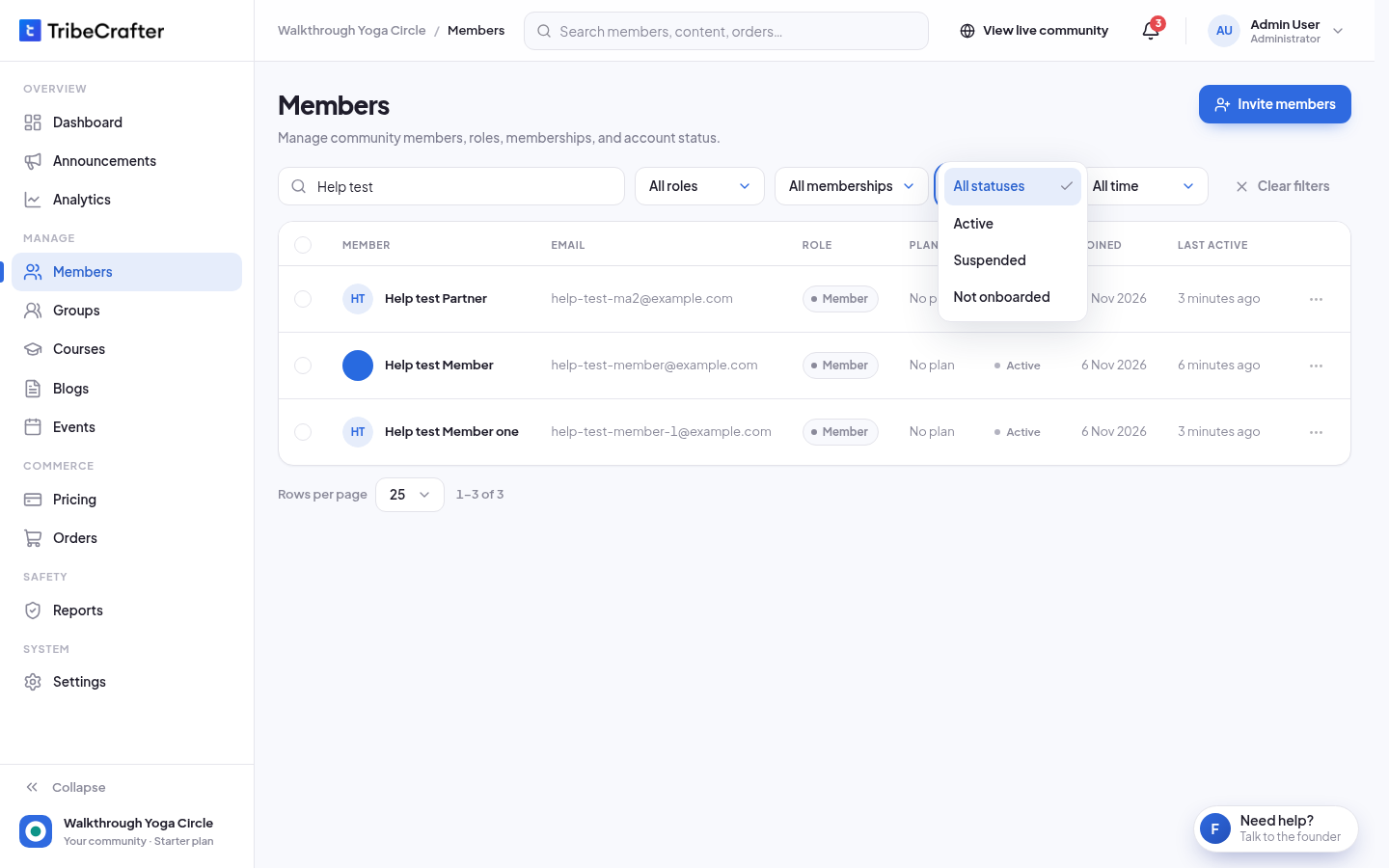
Only members with the Member role can be Not onboarded. Your team roles never get that status. Analytics counts only active members who finished onboarding, so it can show fewer people than the Members page.
Closing sign-up
If you turn off Anyone can sign up in Settings → Sign-in & SSO, the sign-up page closes and you can't send invites. People then join only through your own sign-in (SSO). Only the owner can change this. See Sign-in and single sign-on (SSO).